
Roles
The roles section manages aliases, ordering, and optional hierarchy.
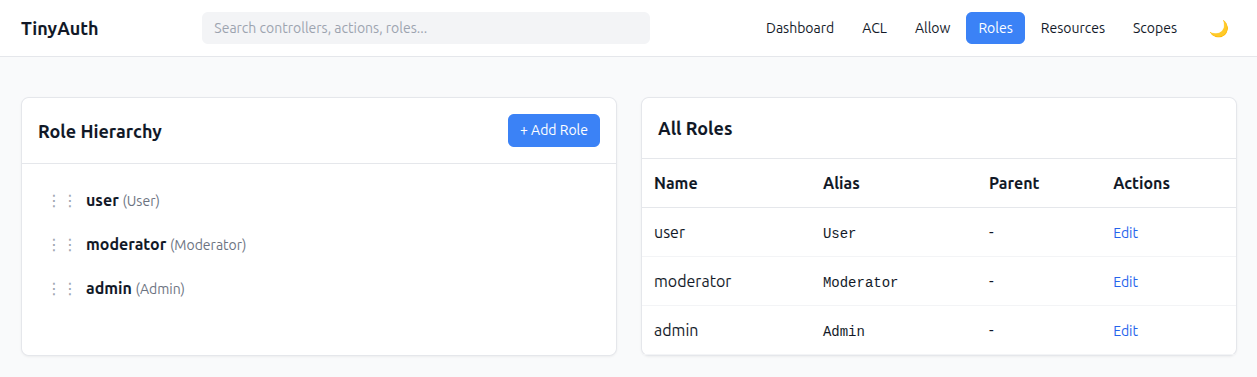
Role fields
| Field | Meaning |
|---|---|
name | Human-readable label |
alias | Runtime role key used by permission checks |
sort_order | Display/order hint |
parent_id | Higher role that this role rolls up into |
Hierarchy semantics
This plugin models hierarchy like this:
admin
  └─ moderator
      └─ user
Meaning:
user.parent_id = moderatormoderator.parent_id = admin- higher roles inherit lower-role permissions
So if user can edit Article, then moderator and admin also inherit that permission unless they have a direct rule of their own.
Direct rules win
A direct rule on the current role always wins over an inherited one.
External role sources
You do not have to manage roles in tinyauth_roles.
TinyAuthBackend.roleSource can be:
null— use the plugin table- a Configure path string
- an array of
alias => id - a callable returning that array
When an external source is used:
- the roles UI becomes read-only
- external roles are mirrored into
tinyauth_rolesso ACL / resource assignments can still be stored with foreign keys - mirrored rows are kept in sync with the external source, and obsolete rows are pruned
Example config
'TinyAuthBackend' => [
    'roleSource' => [
        'user' => 1,
        'moderator' => 2,
        'admin' => 3,
    ],
],
Role IDs must be integers
Whatever you put on the right-hand side of alias => id must be an integer or a numeric string (e.g. 3 or "3"). The plugin stores permission rows keyed by an integer role_id foreign key — that is a deliberate design choice, not a bug — so non-numeric values like UUIDs, opaque slugs, or Keycloak sub claims cannot be used as IDs directly.
Non-numeric IDs are dropped from the map and a warning is written to the default log channel (TinyAuthBackend.roleSource dropped N role(s) with non-numeric ids: ...) so you can spot a misconfigured source instead of wondering why the permission matrix is empty.
I already have UUID roles in my app
Common scenario: you have a pre-existing Users / Roles schema with UUID primary keys, or you pull roles from an upstream IdP (Keycloak, Auth0, Cognito, a SaaS-issued JWT) that uses opaque string IDs.
The plugin does not need to store your UUIDs. All it needs is a stable alias => int mapping; the alias is the part you'll see in rule editors, and the int is an internal handle you own. The easiest recipe:
// Somewhere in your app bootstrap, after the plugin is loaded.
Configure::write('TinyAuthBackend.roleSource', function (): array {
    // Fetch whatever the upstream system considers "the roles the
    // current request has": LDAP groups, IdP scope claims, rows in
    // your own users_roles pivot, etc. Result is an ordered list of
    // *aliases* — that's all you need from the outside world.
    $aliases = MyIdentityService::currentUserRoleAliases();

    // Hand each alias a stable small integer. Hashing the alias keeps
    // the same alias pinned to the same int across requests and
    // deploys without you maintaining a mapping table, and keeps the
    // plugin's FK-backed rows stable as long as your alias strings
    // are stable. (If aliases can be renamed upstream, store the
    // mapping yourself in a small "role_registry" table instead.)
    $map = [];
    foreach ($aliases as $alias) {
        $map[$alias] = crc32($alias) & 0x7fffffff;
    }

    return $map;
});
What happens next:
- The plugin mirrors each alias into
tinyauth_rolesas a "shadow" row with the integer ID you supplied. - Permissions you edit in the admin UI are stored against that integer, foreign-keyed to the shadow row.
- Stale aliases are pruned on the next boot, so if your IdP renames a role the old rule rows vanish with it.
Your UUIDs never enter the plugin tables — they stay in your own identity / user layer, and the plugin only sees the derived aliases.