
Allow (Public Actions)
The Allow page lets you mark actions as publicly accessible — no authentication required.
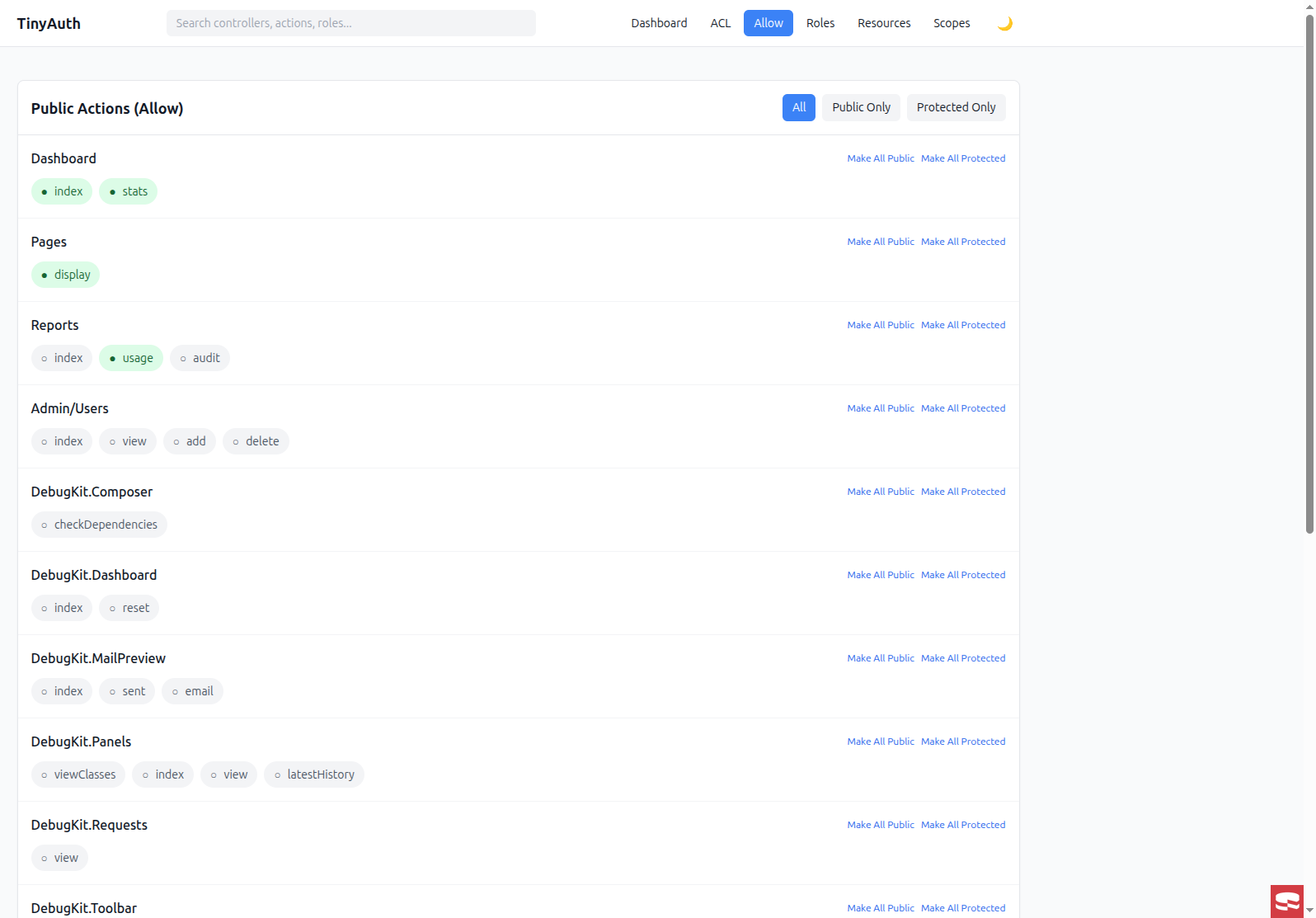
Overview
Public actions bypass authentication entirely: anyone can access them without logging in.
Common examples:
Pages::display— static pagesUsers::login— login pageUsers::register— registration page- API endpoints that don't require auth
Interface
The Allow page displays all controllers with their actions:
- Toggle switch — enable/disable public access per action
- Bulk actions — make all actions in a controller public/protected
Setting public actions
- Find the controller in the list.
- Toggle the switch next to the action.
- Green = public, gray = protected.
Bulk operations
For each controller, you can:
- Make all public — set all actions to public
- Make all protected — remove public access from all actions
Filter options
Filter the view by:
- All — show all actions
- Public — show only public actions
- Protected — show only protected actions
Database schema
Public actions are stored in the tinyauth_actions table:
sql
CREATE TABLE tinyauth_actions (
    id INT AUTO_INCREMENT PRIMARY KEY,
    controller_id INT NOT NULL,
    name VARCHAR(100) NOT NULL,
    is_public BOOLEAN DEFAULT FALSE,  -- This field
    created DATETIME,
    modified DATETIME
);
Programmatic access
php
use TinyAuthBackend\Service\TinyAuthService;

$service = new TinyAuthService();

// Check if action is public
$isPublic = $service->isPublicAction('Pages', 'display');

// Check with plugin/prefix
$isPublic = $service->isPublicAction('Articles', 'view', [
    'plugin' => 'Blog',
]);
Making actions public programmatically
php
$actionsTable = $this->fetchTable('TinyAuthBackend.Actions');

// Find the action
$action = $actionsTable->find()
    ->matching('TinyauthControllers', function ($q) {
        return $q->where([
            'TinyauthControllers.name' => 'Pages',
            'TinyauthControllers.plugin IS' => null,
            'TinyauthControllers.prefix IS' => null,
        ]);
    })
    ->where(['Actions.name' => 'display'])
    ->first();

// Make it public
$action->is_public = true;
$actionsTable->save($action);

// Clear cache
Cache::delete('TinyAuth.allow');
Integration with TinyAuth
The DbAllowAdapter reads from the normalized tables:
php
// In config/app.php
'TinyAuth' => [
    'allowAdapter' => \TinyAuthBackend\Auth\AllowAdapter\DbAllowAdapter::class,
],
The adapter returns data in TinyAuth's expected format:
php
// Returns an array like:
[
    'Pages' => ['display', 'home'],
    'Users' => ['login', 'register'],
    'Blog.Articles' => ['index', 'view'],
]
Security considerations
Review public actions regularly
- Be cautious when making actions public.
- Use the filter to audit which actions are currently public.
- Consider role-based access instead of public access when possible.
See also
- Public Actions concept — the runtime view.
- ACL Matrix — role-based controller/action permissions.