
ACL Matrix
The ACL (Access Control List) page provides a matrix view for managing role-based permissions.
Overview
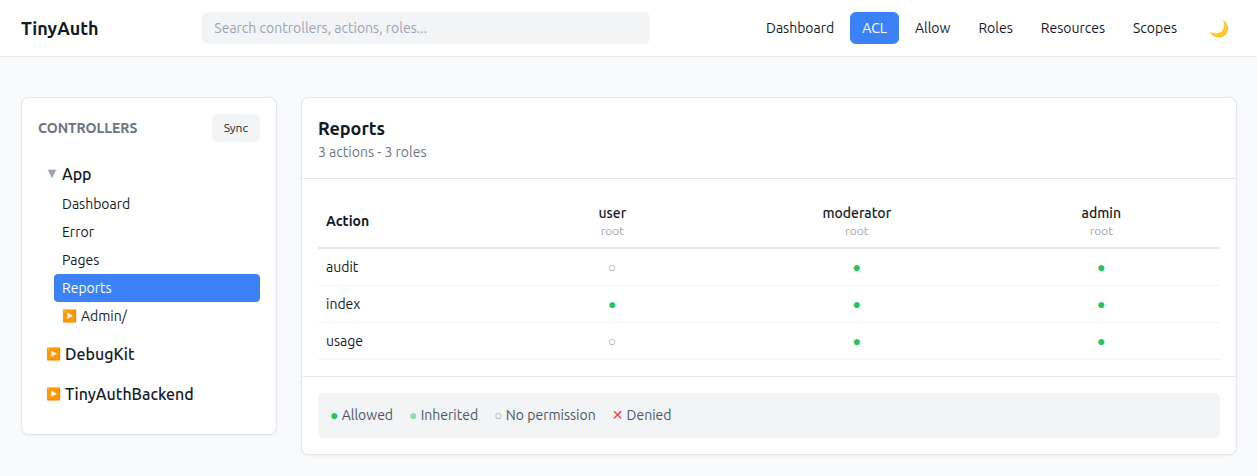
The ACL interface displays:
- Left panel — controller tree grouped by plugin and prefix
- Main panel — permission matrix for the selected controller
Permission matrix
The matrix shows:
- Rows — actions for the selected controller
- Columns — available roles (ordered by hierarchy)
- Cells — permission state
Permission states
| State | Display | Meaning |
|---|---|---|
| None | Gray (empty) | No explicit permission — access denied |
| Allow | Green checkmark | Access granted for this role |
| Deny | Red X | Access explicitly denied (overrides inherited allow) |
Setting permissions
Click on any cell to cycle through permission states:
- None → Allow
- Allow → Deny
- Deny → None
Instant save
Changes are saved immediately via HTMX — there is no separate save button.
Permission logic
- If a role has an explicit
denyfor an action, access is denied. - If a role has an explicit
allowfor an action, access is granted. - If no explicit permission exists, access is denied by default.
Role hierarchy
Permissions can be inherited through role hierarchy:
text
admin (level 3)
  └── moderator (level 2)
        └── user (level 1)
When checking permissions:
- Admin inherits all permissions from moderator and user.
- Moderator inherits all permissions from user.
- Higher roles automatically have lower-role permissions.
See Roles for the full hierarchy model.
Search
Use the search box to quickly find:
- controllers by name
- actions by name
- roles by name or alias
Database schema
sql
-- Controllers table
CREATE TABLE tinyauth_controllers (
    id INT AUTO_INCREMENT PRIMARY KEY,
    plugin VARCHAR(100) NULL,
    prefix VARCHAR(100) NULL,
    name VARCHAR(100) NOT NULL,
    created DATETIME,
    modified DATETIME,
    UNIQUE KEY (plugin, prefix, name)
);

-- Actions table
CREATE TABLE tinyauth_actions (
    id INT AUTO_INCREMENT PRIMARY KEY,
    controller_id INT NOT NULL,
    name VARCHAR(100) NOT NULL,
    is_public BOOLEAN DEFAULT FALSE,
    created DATETIME,
    modified DATETIME,
    UNIQUE KEY (controller_id, name),
    FOREIGN KEY (controller_id) REFERENCES tinyauth_controllers(id)
);

-- ACL permissions table
CREATE TABLE tinyauth_acl_permissions (
    id INT AUTO_INCREMENT PRIMARY KEY,
    action_id INT NOT NULL,
    role_id INT NOT NULL,
    type ENUM('allow', 'deny') NOT NULL,
    created DATETIME,
    modified DATETIME,
    UNIQUE KEY (action_id, role_id),
    FOREIGN KEY (action_id) REFERENCES tinyauth_actions(id),
    FOREIGN KEY (role_id) REFERENCES tinyauth_roles(id)
);
Programmatic access
php
use TinyAuthBackend\Service\TinyAuthService;

$service = new TinyAuthService();

// Check if a user has access to an action
$hasAccess = $service->hasAccess($user, 'Articles', 'edit');

// Check with plugin/prefix
$hasAccess = $service->hasAccess($user, 'Articles', 'edit', [
    'plugin' => 'Blog',
    'prefix' => 'Admin',
]);
Bulk operations
To set permissions for all actions in a controller:
php
$actionsTable = $this->fetchTable('TinyAuthBackend.Actions');
$permissionsTable = $this->fetchTable('TinyAuthBackend.AclPermissions');

$actions = $actionsTable->find()
    ->where(['controller_id' => $controllerId])
    ->all();

foreach ($actions as $action) {
    $permission = $permissionsTable->newEntity([
        'action_id' => $action->id,
        'role_id' => $roleId,
        'type' => 'allow',
    ]);
    $permissionsTable->save($permission);
}

// Clear cache
Cache::delete('TinyAuth.acl');
See also
- Allow (Public Actions) — actions reachable without auth.
- Resources — entity-level authorization.