
PHP File Illuminator
The Illuminator can modify your PHP files based on Illuminator rule sets. You can use the pre-set tasks, or create your own to enhance your PHP files and classes.
Modifies functional code
Unlike the Annotator, which only updates doc blocks and annotations, the Illuminator actually modifies existing code. Make sure to back up or commit your changes before running it.
Each task has its own scope defined, based on path or filename. If a task's scope does not match a file, it is skipped.
Use -p PluginName to run inside a plugin.
Plugin wildcards
Use * to refer to a group of plugins, e.g. -p SomePrefix/* for everything under your own plugins/ directory. You can also use all for all app plugins.
For more than one plugin the command will not run into vendor/ plugins, to avoid accidental modification there.
Available Tasks
EntityField
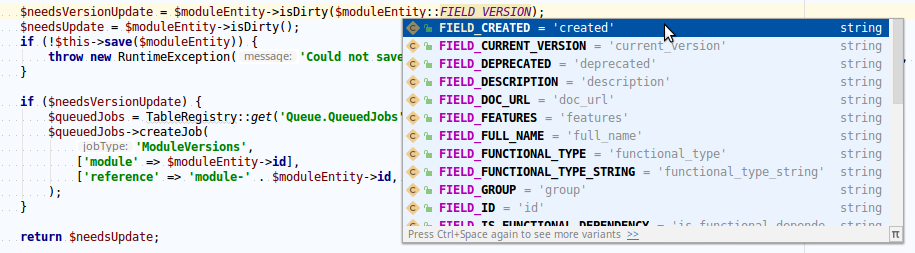
Your entities expose their fields either via get()/set() or as class properties. Especially when using them through methods, you have no type-hinting/autocomplete on those magic strings. In these cases, having class constants is the solution.
This task adds them based on the defined property annotations in the doc block:
/**
 * @property int $id
 * @property string $brand_name
 * @property \Cake\I18n\DateTime $created
 * @property \Cake\I18n\DateTime|null $retired
 * @property \App\Model\Entity\Wheel[] $wheels
 */
class Car extends Entity {

    public const FIELD_ID = 'id';
    public const FIELD_BRAND_NAME = 'brand_name';
    // ...

}
This is especially useful for code like:
// old
$carEntity->setDirty('wheels');

// new
$carEntity->setDirty($carEntity::FIELD_WHEELS);
or:
// old
$query->orderByDesc('publish_date');

// new
$query->orderByDesc(Post::FIELD_PUBLISH_DATE);
This allows for less typing as autocomplete finds it immediately — and for usage display (IDE → right-click → get usage). That also means refactoring is much easier this way (via the IDE, usually a clean one-modification-refactor across the whole project).
Visibility flag
Since PHP 7.1+ this task adds the public visibility flag if you don't configure it otherwise.
This task does not clean out removed or renamed fields. You should quickly check for usage of the constant — if unused it can be safely removed.
Adding Your Own Tasks
Create your own task class:
namespace App\Illuminator\Task;

use IdeHelper\Illuminator\Task\TaskInterface;

class MyTask implements TaskInterface {

    /**
     * @param string $path
     * @return bool
     */
    public function shouldRun(string $path): bool {
        // ...
    }

    /**
     * @param string $content
     * @param string $path
     * @return string
     */
    public function run(string $content, string $path): string {
        // ...
    }

}
Then add it to the config:
'IdeHelper' => [
    'IlluminatorTasks' => [
        'MyTask' => \App\Illuminator\Task\MyTask::class,
    ],
],
The key 'MyTask' can be any string, but it must be unique across all existing tasks.
Replacing native tasks
Using associative arrays you can swap any native task with your own implementation:
'IdeHelper' => [
    'IlluminatorTasks' => [
        \IdeHelper\Illuminator\Task\FooBarTask::class => \App\Illuminator\Task\MyEnhancedFooBarTask::class,
    ],
],
The native class name is the key, your replacement the value. Setting the value to null disables a native task entirely.
Configuration
You can specify specific settings via app.php config:
'IdeHelper.illuminatorIndentation'as' 'to use spaces as indentation whitespace; defaults to"\t".
Important Constraint
Some tasks may be based on the results of the Annotator. Make sure to run the Annotator first, e.g.:
bin/cake annotate all && bin/cake illuminate code <path>CI or Pre-Commit Check
Using -d (dry run) you will get error code 2 if the file would need updating. This way you can automate the check for CI tooling or commit hooks.