
Overview
The FileStorage plugin gives you the ability to upload and store files in virtually any kind of storage backend. It builds on the FlySystem library in a CakePHP fashion and provides a simple, unified way to use storage adapters.
Storage adapters present a single interface for storing file data to your local file system, in memory, in a database, in a zip file, or on remote systems such as Amazon S3 or Azure. A database table keeps track of what you stored and where. You can always write your own adapter or extend existing ones.
CakePHP version
This documentation is for the branch that supports PHP 8.2+ and CakePHP 5.3.4+. See the version map for older releases.
How it works
The whole plugin is built with clear Separation of Concerns (SoC) in mind: a file is always an entry in the file_storage table from the application's perspective.
The table is the reference to the real place where the file is stored, and it keeps some metadata too: mime type, filename, a hash of the file content, and size.
Don't store paths in arbitrary tables
Storing the path to a file inside an arbitrary table alongside other data is considered bad practice: it doesn't respect SoC from an architecture perspective. Many people do it anyway; this plugin gives you a cleaner option.
You associate the file_storage table with your model using the FileStorage model from the plugin via hasOne or hasMany. When you upload a file, you save it to the FileStorage model through the associations, Documents.file, for example. The FileStorage behavior builds the path, stores the bytes through the configured adapter and runs the configured processor. Events let your application extend that lifecycle.
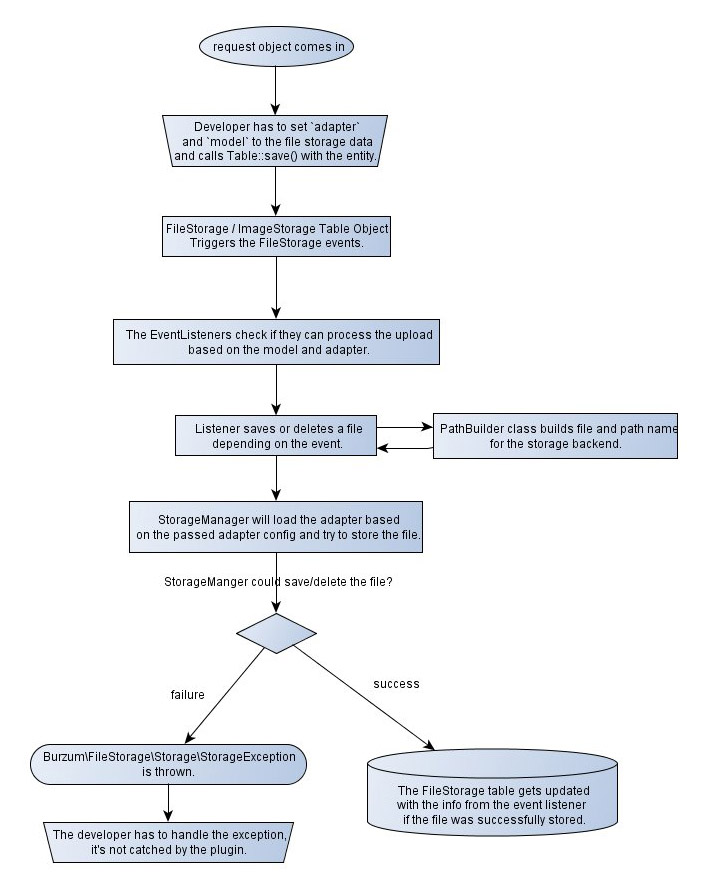
The pieces
| Concept | Responsibility |
|---|---|
file_storage table | The single source of truth: one row per stored file, with metadata. |
| Storage adapter | Where the bytes actually live (Local, S3, Azure, in-memory, …). |
| Path builder | Generates a deterministic storage path from the entity data. |
| FileStorage behavior | Wires upload handling into your table's save/delete lifecycle. |
| Image processor | Generates image variants (thumbnails, crops, alt formats). |
Next steps
- Installation: install the plugin and set up the database.
- Upgrading: migrate existing apps to the 5.x schema.
- Quick Start: add an avatar upload end to end.
- Usage: the core concepts, associations, and upload flow.
- Deduplication - store identical uploads once.
- Resumable uploads - upload large files in chunks and continue after a dropped connection.
- Serving files: generate URLs and serve files with authorization.